Built-in Private Cloud Cluster
Environment Preparation
If deploying a kubernetes cluster on a built-in private cloud, you need to first import CentOS 7 or Kylin images. The following uses CentOS image import as an example. The operation is as follows:
- Enter the Host menu, select the system image upload button
- Enter image name 'CentOS-7.6.1810-20190430.qcow2'
- Upload method select 'Enter Image URL', image URL is: https://iso.yunion.cn/vm-images/CentOS-7.6.1810-20190430.qcow2
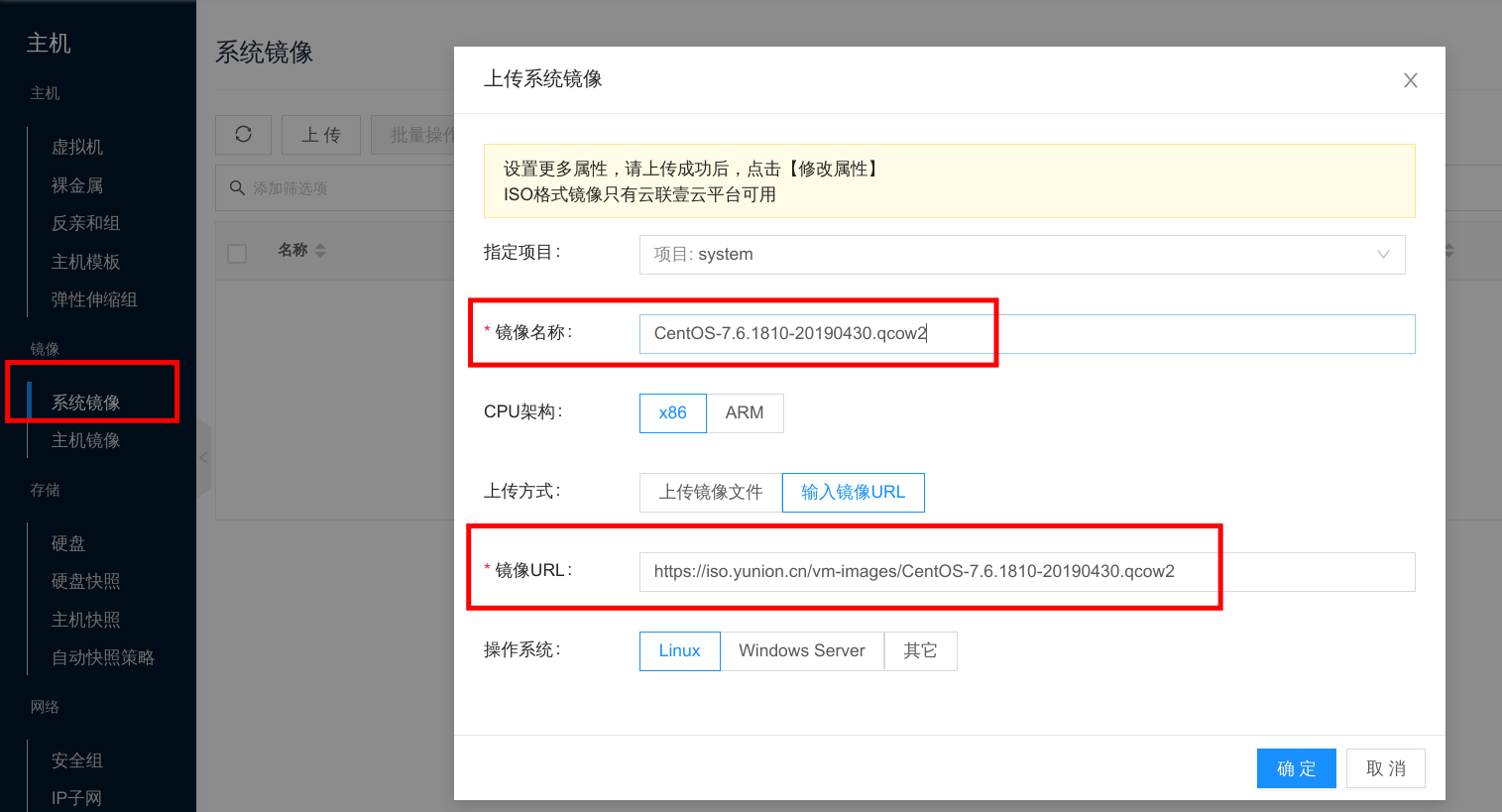
After the image import is complete, you can use this image to create virtual machines and deploy kubernetes clusters.
Offline Deployment
If the virtual machine nodes used as K8s cannot connect to the public network, you can use the following method to configure offline deployment.
Offline deployment only supports K8s clusters created on built-in private cloud.
Deploy kubeserver offline Service
First, deploy the kubeserver-offline offline service to the system's K8s cluster. The kubeserver-offline yaml resource description file is as follows. You can adjust it according to your environment:
---
apiVersion: apps/v1
kind: Deployment
metadata:
  annotations:
  labels:
    app: kubeserver-offline-server
    app.kubernetes.io/component: kubeserver-offline-server
  name: kubeserver-offline-server
  namespace: onecloud
spec:
  progressDeadlineSeconds: 600
  replicas: 1
  revisionHistoryLimit: 10
  selector:
    matchLabels:
      app: kubeserver-offline-server
      app.kubernetes.io/component: kubeserver-offline-server
  strategy:
    rollingUpdate:
      maxSurge: 25%
      maxUnavailable: 25%
    type: RollingUpdate
  template:
    metadata:
      labels:
        app: kubeserver-offline-server
        app.kubernetes.io/component: kubeserver-offline-server
    spec:
      affinity:
        nodeAffinity:
          requiredDuringSchedulingIgnoredDuringExecution:
            nodeSelectorTerms:
            - matchExpressions:
              - key: onecloud.yunion.io/controller
                operator: In
                values:
                - enable
      containers:
      - command:
        - nginx
        - -g
        - daemon off;
        # kubeserver-offline-nginx image, contains dependent binaries and rpm packages
        image: registry.cn-beijing.aliyuncs.com/zexi/kubeserver-offline-nginx:v0.0.2
        imagePullPolicy: IfNotPresent
        name: nginx
        ports:
        - containerPort: 80
          name: nginx
          protocol: TCP

      - name: registry
        # kubeserver-offline-registry image, contains container images needed
        image: registry.cn-beijing.aliyuncs.com/zexi/kubeserver-offline-registry:v0.0.2
        imagePullPolicy: IfNotPresent
        ports:
        - containerPort: 5000
          name: registry
          protocol: TCP
      dnsPolicy: ClusterFirst
      restartPolicy: Always
      schedulerName: default-scheduler
      securityContext: {}
      terminationGracePeriodSeconds: 30
      tolerations:
      - effect: NoSchedule
        key: node-role.kubernetes.io/master
      - effect: NoSchedule
        key: node-role.kubernetes.io/controlplane
---
apiVersion: v1
kind: Service
metadata:
  labels:
    app: kubeserver-offline-server
    app.kubernetes.io/component: kubeserver-offline-server
  name: kubeserver-offline-server
  namespace: onecloud
spec:
  ports:
  - name: http
    port: 80
    protocol: TCP
    targetPort: 80
    nodePort: 31080
  - name: registry
    port: 5000
    protocol: TCP
    targetPort: 5000
    nodePort: 31500
  selector:
    app: kubeserver-offline-server
    app.kubernetes.io/component: kubeserver-offline-server
  sessionAffinity: None
  type: NodePort
Save the above content to kubeserver-offline.yaml file and save it to the control node, then apply it to the system cluster.
$ kubectl apply -f kubeserver-offline.yaml

# Check pod status, wait until it becomes Running
# Because kubeserver-offline-nginx and kubeserver-offline-registry images are large, totaling about 2.9G, please wait patiently for image download
$ kubectl get pods -n onecloud  | grep kubeserver-offline
kubeserver-offline-server-775f99fcbd-qq2mc          2/2     Running   0          7h18m

# kubeserver-offline has exposed service in NodePort mode
# By default, port 31080 is nginx service, 31500 is registry image service
$ kubectl get service -n onecloud | grep kubeserver-offline
kubeserver-offline-server           NodePort    10.106.28.148    <none>        80:31080/TCP,5000:31500/TCP       18h
Configure kubeserver to Use Offline Service
Configure kubeserver's offline configuration. The command is as follows:
climc service-config-edit k8s
Add offline_nginx_service_url and offline_registry_service_url addresses in the configuration.
The value of offline_nginx_service_url is: http://$Control Node IP:31080
The value of offline_registry_service_url is: $Control Node IP:31500
Assuming the control node IP is 192.168.222.171, the related configuration parameters are as follows:
default:
  ...
  offline_nginx_service_url: "http://192.168.222.171:31080"
  offline_registry_service_url: "192.168.222.171:31500"
After configuration is complete, clusters created afterwards will download binaries, rpm packages, and container images from the kubeserver-offline offline service.