Common Questions
No Resources on Creation Page
Symptom
- As shown below, there are no selectable resources on the creation page
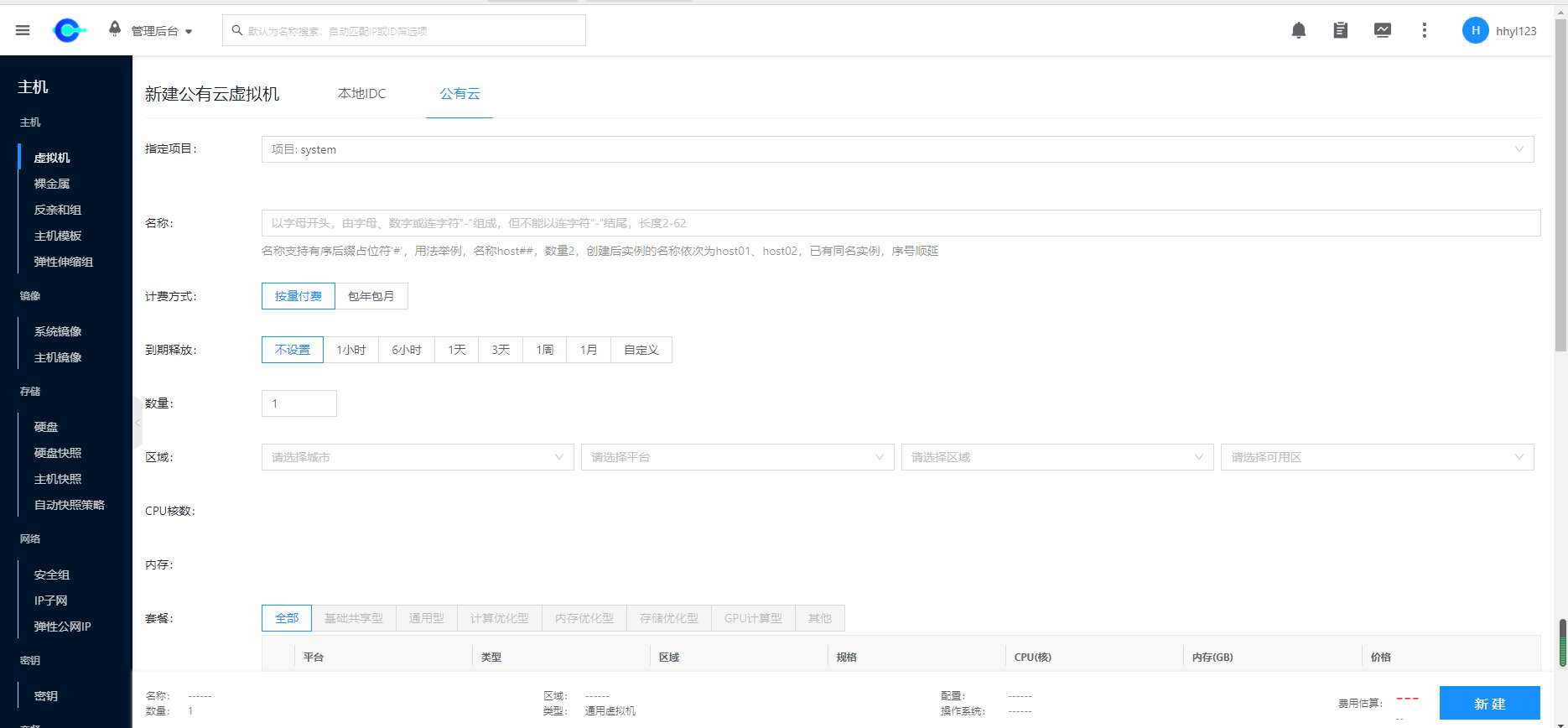
Possible Causes
- Frontend cache
- Can be resolved by refreshing the entire page
- Cloud account health status is abnormal
- Check Health Check
- No available instance types
- Instance type synchronization is abnormal (generally caused by no external network connection)
- Please check if the control node can communicate normally with
https://yunionmeta.oss-cn-beijing.aliyuncs.com - Synchronize cloud account again
- No available IP subnets
- The page defaults to showing platforms and regions with IP subnets
- If the desired platform or region is not on the page, please ensure that the selected platform and region have normal IP subnets
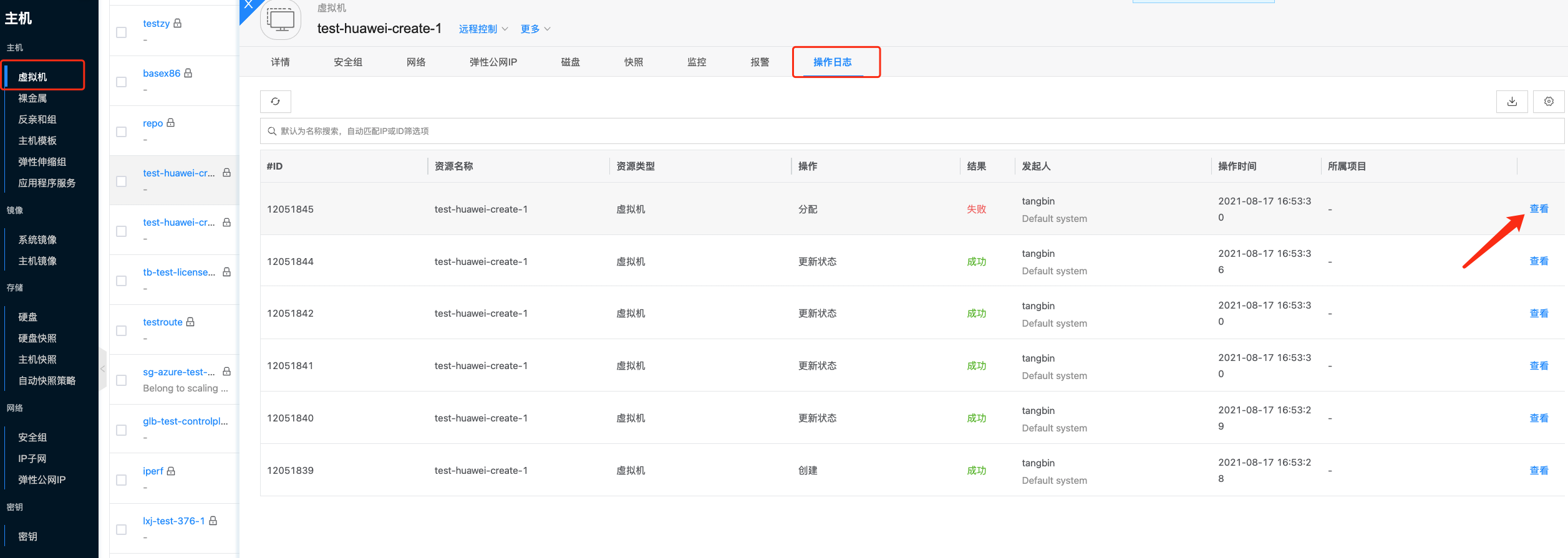
View Virtual Machine Logs
- Click on the log with failed result as shown in the figure
Virtual Machine Creation Failure Issues Summary
Common Errors Summary
- General
- Alibaba Cloud
- Tencent Cloud
- Azure
- AWS
- iStorageCache.GetIImageById: NotFoundError
- This error is generally caused by images not being updated in time
- For release/3.6 and earlier versions, public cloud images depend on cloud account updates. If the account has not been fully synchronized for a long time, images may be inconsistent with the public cloud. You need to manually fully synchronize the cloud account, or set the cloud account to automatically synchronize to fix
- For release/3.7 and later versions, we periodically synchronize public cloud images and update the results to Alibaba Cloud OSS in real time. The platform fetches the latest images from Alibaba Cloud OSS daily, no longer depending on cloud account synchronization. This setting only applies to public cloud public images. If using public cloud custom images, you still need to synchronize the cloud account to update the image list
- Failed to create specification ecs.t5-c1m1.large.processCommonRequest: SDK.ServerError\nErrorCode: InvalidParameter.NotMatch\nRecommend: https://error-center.aliyun.com/status/search?Keyword=InvalidParameter.NotMatch&source=PopGw\nRequestId: BAD90CC0-D76D-589D-9701-1516A6FC3C13\nMessage: the provided 'Image -> os_type: CentOS' and 'Rule -> os_type: exclude[Ubuntu Debian Aliyun CentOS]' are not matched.
- This return result is generally caused by a conflict between the selected instance type and image
- You can choose a non-UEFI image to avoid this error
- Github Issue
- [TencentCloudSDKError] Code=ImageQuotaLimitExceeded, Message=FailedOperation: Failed to create image as the number of image 10 cannot exceed the quota for image 10
- This issue occurs when using public cloud private images to create machines. Each region supports up to 10 custom images. You can contact Tencent Cloud to increase the quota for each region, or delete unused private images
- Occasionally, you may encounter this error even when a region has 9 custom images
- Allocation failed. We do not have sufficient capacity for the requested VM size in this region. Read more about improving likelihood of allocation success at http://aka.ms/allocation-guidance\
- This issue generally occurs when Azure resources are insufficient, or the instance type is not available in the selected region
- Please change the instance type, or change the region and try creating again
- Failed to create specification c6g.medium.Unsupported: The requested configuration is currently not supported. Please check the documentation for supported configurations
- The current account does not support the c6g.medium instance type, the reason is not found, other accounts may support it
- Currently, when this error occurs, you can only change the instance type
General Issues Summary
-
Client.Timeout exceeded while awaiting headers
-
ClientError read tcp 10.40.52.146:57462->10.168.26.243:3128: i/o timeout
- This issue generally occurs when the network environment is poor, or a proxy is used
- Please check the network environment, or check the proxy logs to see if there is a timeout
-
dial tcp: lookup example.com on 192.168.222.171:53: read udp 10.168.222.219:463933->192.168.222.171:53: i/o timeout
- This issue generally occurs when DNS network is not connected and cannot resolve domain names normally
- Please check DNS configuration and retry the operation
Password Reset Failure Issues Summary
Common Errors Summary
- ZStack
- operation error, because:qemu-agent service is not ready in vm
- ZStack password reset depends on qemu-agent. Please ensure that qemu-agent is running normally in the virtual machine