Locate Backend Code
Introduction to how to locate backend code from frontend API requests.
View Frontend Requests
Here we use virtual machines as an example
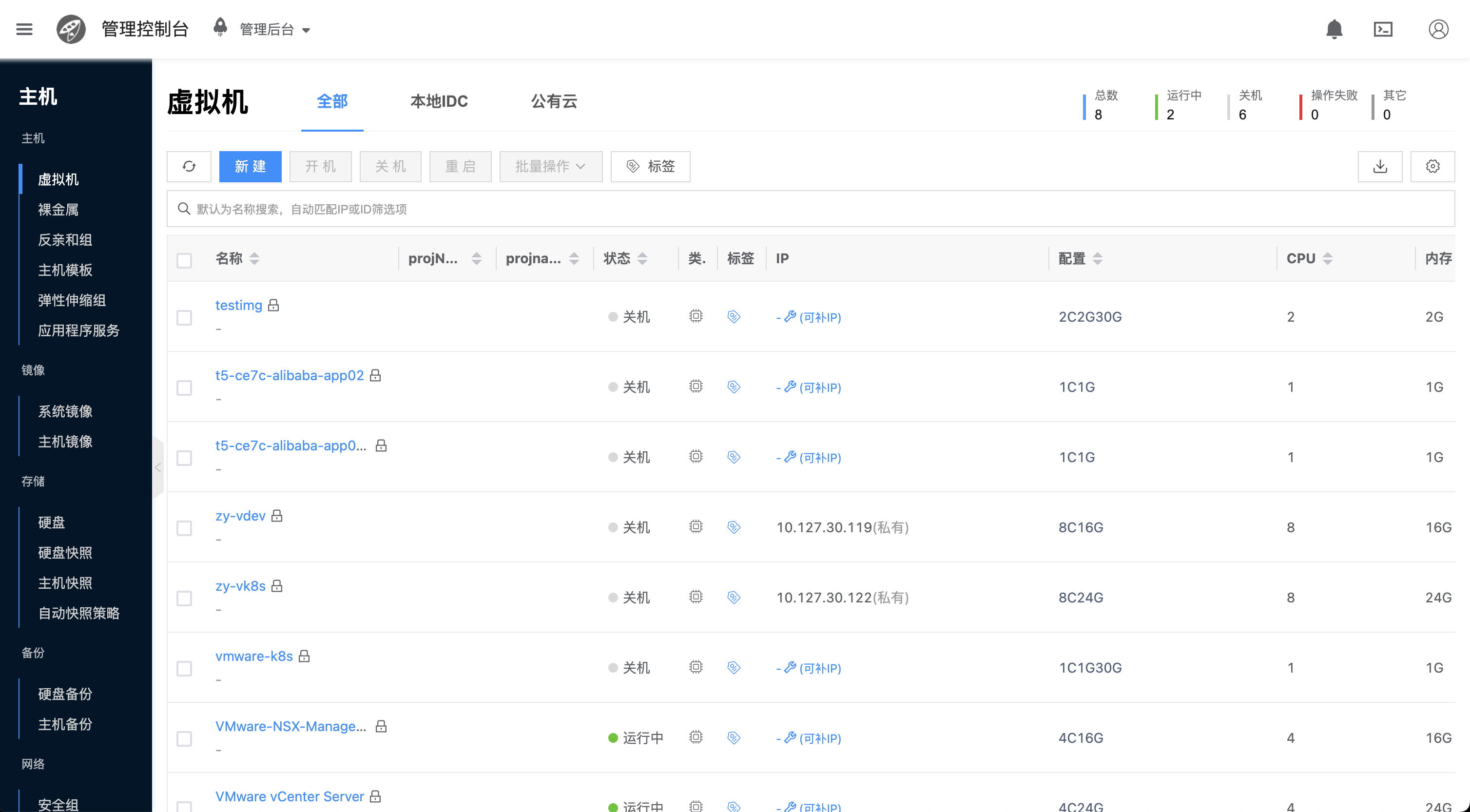
- Open the virtual machine list interface
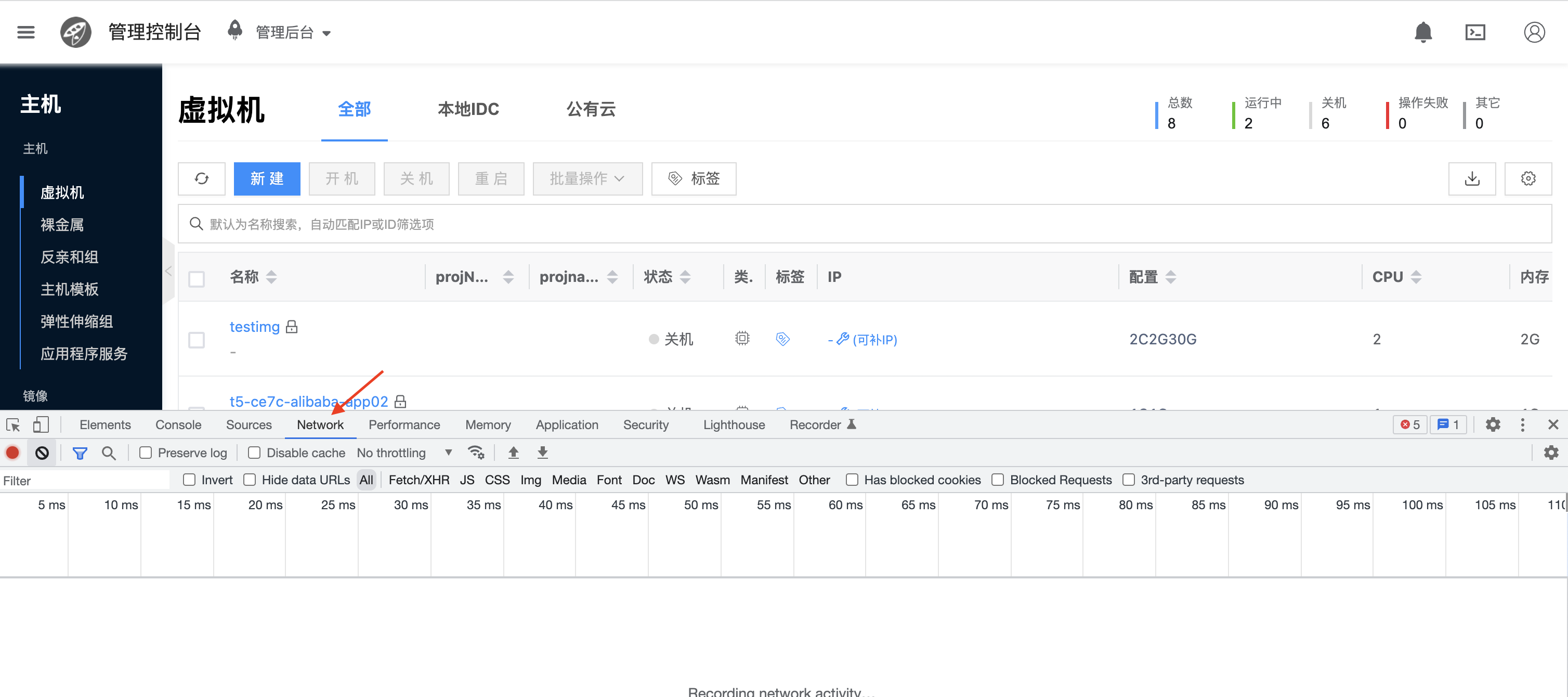
- Right-click to open inspection and switch to Network
- Click refresh and view network requests
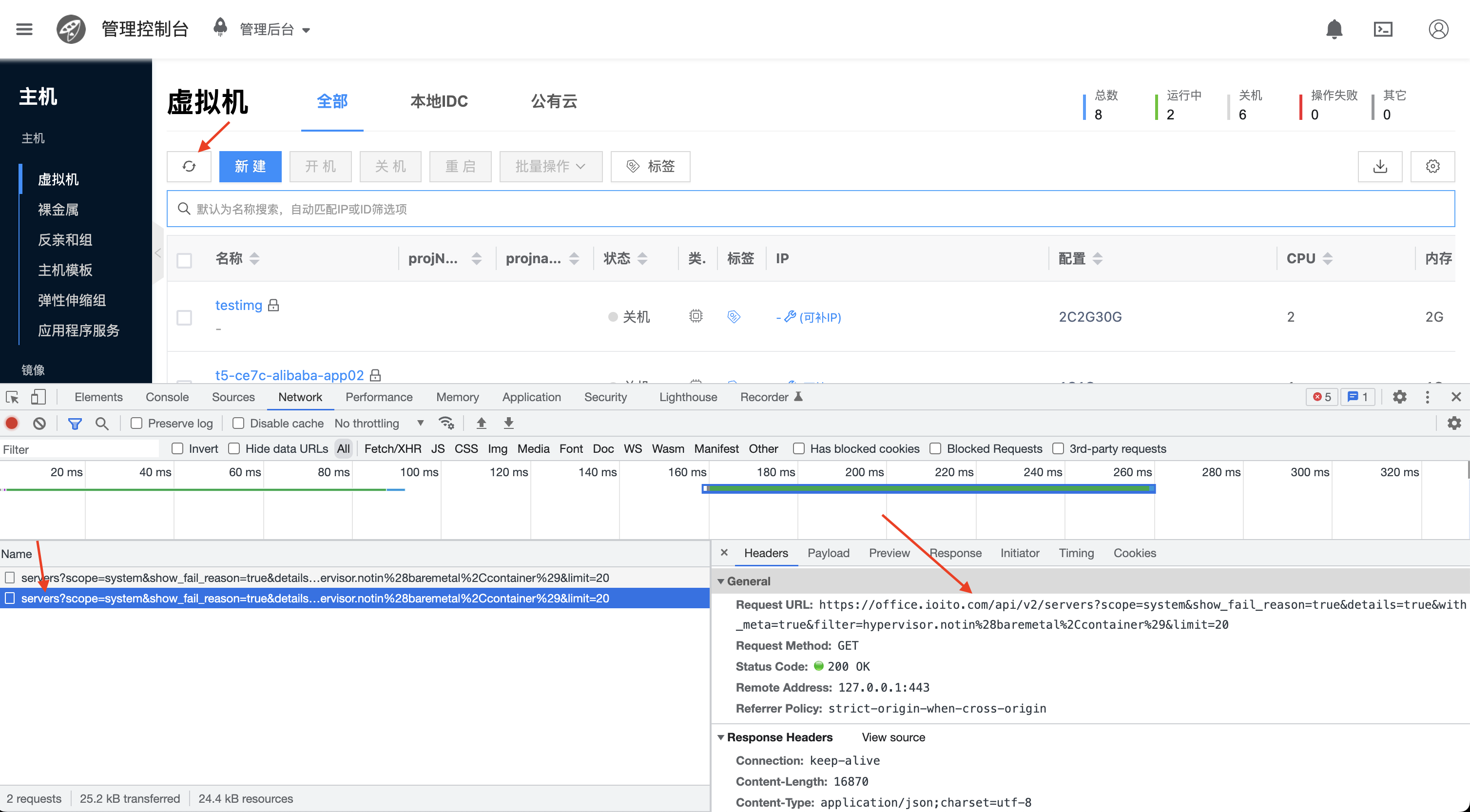
Here we see the API request is GET https://office.ioito.com/api/v2/servers. For other requests, you can check API Request Methods
We can determine that the requested resource is servers
Locate Code by Resource Name
# Enter the cloudpods source code directory
$ cd cloudpods

# Search by keyword 'servers'
$ grep -r 'servers' pkg/mcclient/modules
pkg/mcclient/modules/compute/mod_servers.go:    Servers = ServerManager{modules.NewComputeManager("server", "servers",
pkg/mcclient/modules/compute/mod_skus.go:       ServerSkus = ServerSkusManager{modules.NewComputeManager("serversku", "serverskus",


# We can see that servers belongs to the compute (region) service. Now search for the servers keyword in the compute service's models
$ grep -r 'servers' pkg/compute/models
pkg/compute/models/loadbalanceragents.go:       servers = ["{{ .telegraf.haproxy_input_stats_socket }}"]
pkg/compute/models/skus.go:                     "serverskus_tbl",
pkg/compute/models/skus.go:                     "serversku",
pkg/compute/models/skus.go:                     "serverskus",
pkg/compute/models/skus.go:             return httperrors.NewNotEmptyError("now allow to delete inuse instance_type.please remove related servers first: %s", self.Name)
pkg/compute/models/skus.go:             return httperrors.NewNotEmptyError("instance_type used by servers")
pkg/compute/models/skus.go:     lockman.LockRawObject(ctx, "serverskus", region.Id)
pkg/compute/models/skus.go:     defer lockman.ReleaseRawObject(ctx, "serverskus", region.Id)
pkg/compute/models/skus.go:     lockman.LockRawObject(ctx, "serverskus", region.Id)
pkg/compute/models/skus.go:     defer lockman.ReleaseRawObject(ctx, "serverskus", region.Id)
pkg/compute/models/guests.go:// +onecloud:swagger-gen-model-plural=servers
pkg/compute/models/guests.go:                   "servers",
pkg/compute/models/guests.go:           // fake delete expired prepaid servers
pkg/compute/models/groups.go:                   return nil, errors.Wrapf(httperrors.ErrInvalidStatus, "inconsistent networkId for member servers")
pkg/compute/models/hosts.go:                    "__on_host_down":              "shutdown-servers",
pkg/compute/models/hosts.go:            _, err := self.Request(ctx, userCred, "POST", "/hosts/shutdown-servers-on-host-down",
pkg/compute/models/hosts.go:                    db.OpsLog.LogEvent(host, db.ACT_HOST_DOWN, fmt.Sprintf("migrate servers failed %s", err), userCred)
pkg/compute/models/keypairs.go:         return httperrors.NewNotEmptyError("Cannot delete keypair used by servers")
pkg/compute/models/disks.go:            return httperrors.NewNotEmptyError("Virtual disk %s(%s) used by virtual servers", self.Name, self.Id)
pkg/compute/models/guest_actions.go:    url := fmt.Sprintf("%s/servers/%s/monitor", host.ManagerUri, self.Id)
pkg/compute/models/guest_actions.go:    taskData.Set("servers", jsonutils.Marshal(host.Servers))

# From above, we can see that only the pkg/compute/models/guests.go file has the complete servers keyword. We can determine the code is located in this file
# Let's introduce the guests.go file in detail
$ cat pkg/compute/models/guests.go | grep '"servers"' -A 7 -B 6
func init() {
        GuestManager = &SGuestManager{
                SVirtualResourceBaseManager: db.NewVirtualResourceBaseManager(
                        SGuest{},
                        "guests_tbl",
                        "server",
                        "servers",
                ),
                SRecordChecksumResourceBaseManager: *db.NewRecordChecksumResourceBaseManager(),
        }
        GuestManager.SetVirtualObject(GuestManager)
        GuestManager.SetAlias("guest", "guests")
        GuestManager.NameRequireAscii = false
}

# From above, we can see that this initializes the virtual machine's Manager. Virtual machine data is stored in the guests_tbl table in the database
Special API Request Instructions
Most requests can find backend code using the above method, but some API requests are directly registered by the gateway These types of APIs need to check API Gateway code
Here we use RPC API as an example
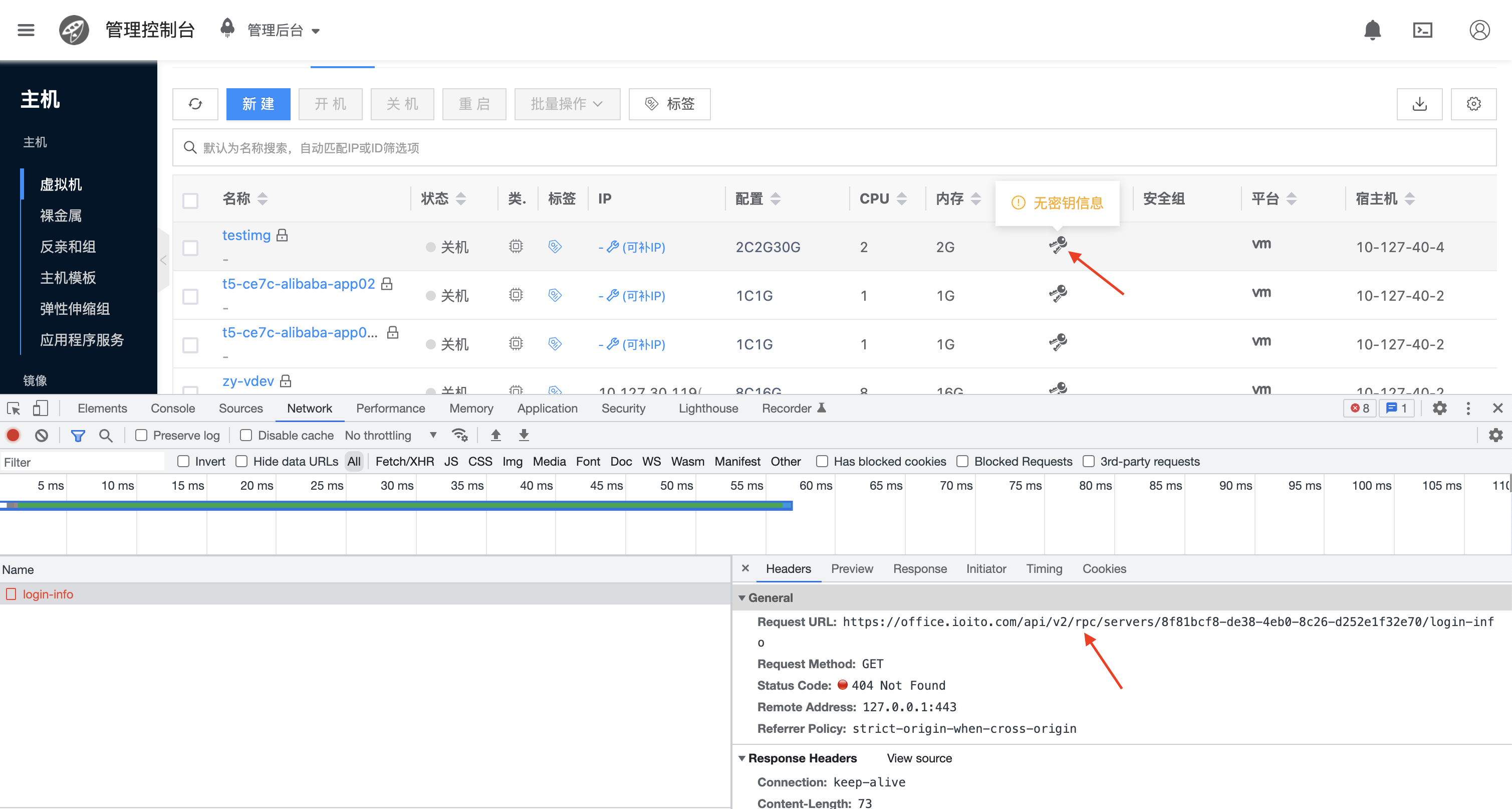
- Click to get virtual machine password and view api request
# Search for rpc keyword
$ grep -r 'rpc' pkg/apigateway/handler
pkg/apigateway/handler/rpc.go:  h.AddByMethod(GET, mf, NewHP(RpcHandler, APIVer, "rpc"))
pkg/apigateway/handler/rpc.go:  h.AddByMethod(POST, mf, NewHP(RpcHandler, APIVer, "rpc"))


# By viewing the API gateway RpcHandler source code, we can see that RPC requests rely on reflection to call GetXXX or DoXXX in mcclient models
# Here XXX is camelCase naming
# Here we see it's a GET request, so we can know it calls GetLoginInfo in servers
# Therefore, we can successfully find the related implementation
$ grep -r 'GetLoginInfo' pkg/mcclient/modules/compute
pkg/mcclient/modules/compute/mod_servers.go:func (this *ServerManager) GetLoginInfo(s *mcclient.ClientSession, id string, params jsonutils.JSONObject) (jsonutils.JSONObject, error) {
pkg/mcclient/modules/compute/mod_hosts.go:func (this *HostManager) GetLoginInfo(s *mcclient.ClientSession, id string, params jsonutils.JSONObject) (jsonutils.JSONObject, error) {
pkg/mcclient/modules/compute/mod_dbinstanceaccounts.go:func (this *SDBInstanceAccountManager) GetLoginInfo(s *mcclient.ClientSession, id string, params jsonutils.JSONObject) (jsonutils.JSONObject, error) {
pkg/mcclient/modules/compute/mod_elasticcache.go:func (self *ElasticCacheManager) GetLoginInfo(s *mcclient.ClientSession, id string, params jsonutils.JSONObject) (jsonutils.JSONObject, error) {
pkg/mcclient/modules/compute/mod_elasticcache.go:func (self *ElasticCacheAccountManager) GetLoginInfo(s *mcclient.ClientSession, id string, params jsonutils.JSONObject) (jsonutils.JSONObject, error) {