Physical Machine Test Process
Describes the test process and general steps for physical machine functionality.
1. Environment Requirements
1.1 Physical Machine Settings
Physical machine settings requirements are as follows:
-
Physical machine boot method can use legacy (BIOS) method or UEFI method.
-
Physical machine's default boot method is network PXE boot, hard disk boot is the second priority boot medium
-
Need to allow physical machine network card's PXE boot (BIOS enable IPMI-over-LAN)
-
Need to allow network access to physical machine's BMC (BIOS enable network card PXE)
1.2 Test Network Settings
Physical server network interfaces (NIC) are divided into BMC NIC and server NIC. BMC NIC is used to access physical machine's BMC control functionality through network. BMC NIC can be configured to share physical machine interfaces with server NIC, or can be configured as independent network interfaces.
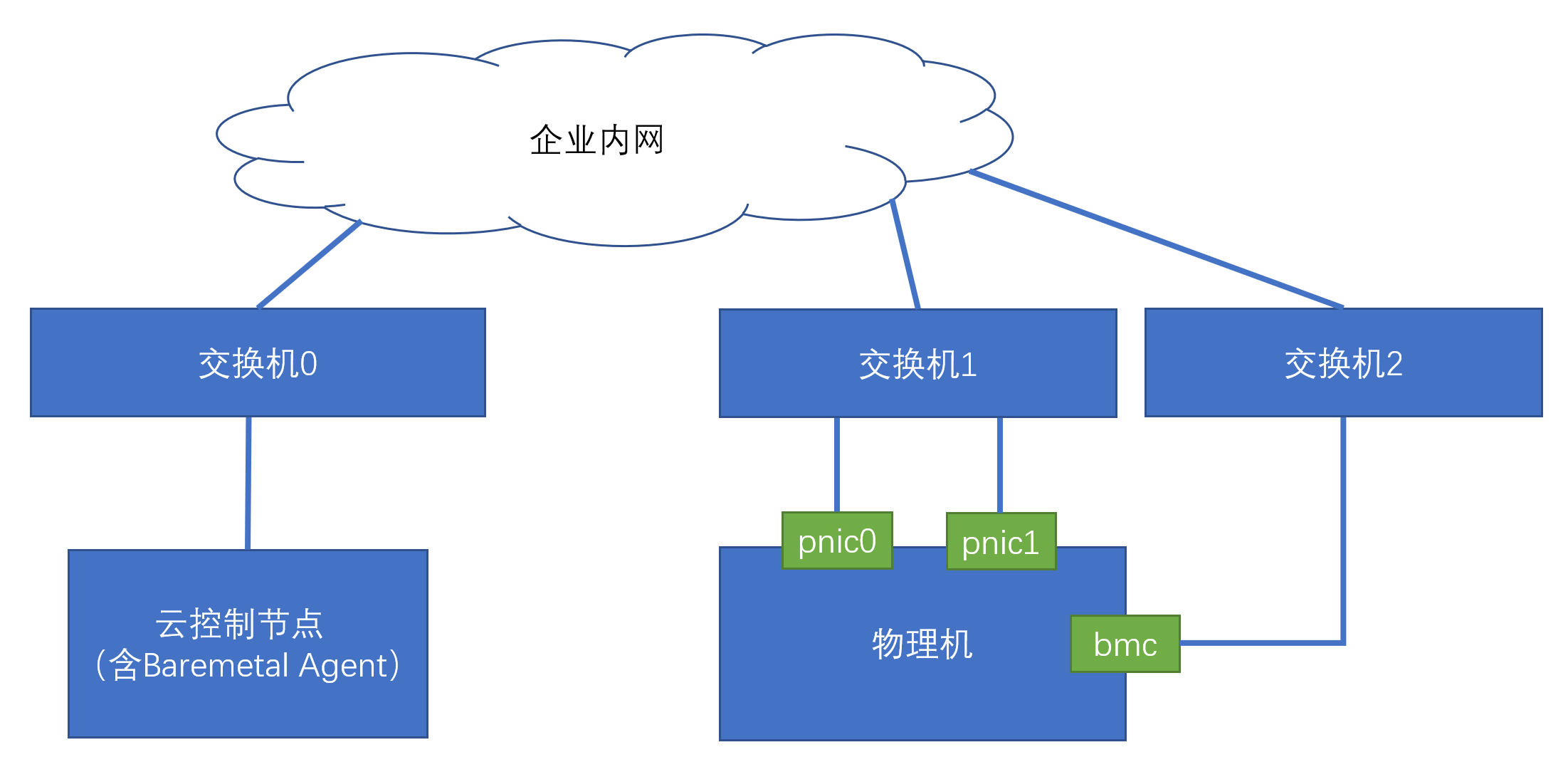
Among them, Switch 0 is the layer 3 switch where the node deploying services is connected. Switch 1 is the layer 3 switch where the server NIC of the physical server to be managed is connected. Switch 2 is the layer 3 switch where the BMC NIC of the physical server to be managed is connected.
Here, Switch 0, 1, 2 can be the same layer 3 switch. This is the most simplified scenario, that is, the service node, the server NIC of the physical server to be managed, and the BMC NIC are all in the same layer 2 network.
Generally, physical machine servers using bonding need to configure dual NIC connections. Currently only 802.3ad LACP mode is supported, that is, mode 4 bond. If you want to support bond mode, both NICs of the physical machine need to be connected to Switch 1. Here Switch 1 may be a pair of stacked switches.
1.3 IP Subnet Settings
You need to make the following configurations on the platform for physical machine IP address allocation: Create a layer 2 network for new physical machines (e.g.: brbm). If the physical machine BMC NIC and physical machine NIC's layer 2 networks are isolated, you need to create a layer 2 network brbmc for BMC NIC. Create an IP subnet with baremetal or PXE attributes on layer 2 network brbm (vbm), used to allocate physical machine NIC IP addresses. Create an IP subnet with IPMI attributes on layer 2 network brbmc (or bmbm) (vbmc), used to allocate BMC NIC IP addresses.
Connectivity requirements: Require that baremetal agent can directly access IP addresses of vbm and vbmc.
1.4 Switch Settings
To allow physical machines to network PXE boot, you need to set switch 1's dhcp_relay to the UDP port 67 of the node IP address where baremetal_agent is located.
-
If using "pre-registration" method to register physical machines, you also need to set switch 2's dhcp_relay to the UDP port 67 of the node IP address where baremetal_agent is located.
-
In the simplest network mode, which is still the network configuration where services and physical machines to be managed are in the same IP subnet as mentioned above, if it is not convenient to enable the layer 3 switch's dhcp_relay, you can borrow the platform's Host service, enable its dhcp_relay function, and use it as the dhcp relay server for the test IP subnet. The specific enabling method is: modify the configuration file /etc/yunion/host.conf of the host where the Host service is located, add the dhcp_relay configuration item, with content as the UDP port 67 of the node IP where baremetal_agent is deployed. After configuration, remember to restart the host service.
If using a docker compose deployment environment, you don't need to set /etc/yunion/host.conf. This deployment method has dhcp_relay service enabled by default.
dhcp_relay:
- 192.168.222.101
- 67
There cannot be other DHCP servers in the network where physical machines to be managed are located!
1.5 Physical Machine Hardware Information Requirements
You need to prepare the following information of physical machines in advance:
- If using PXE boot registration or pre-registration physical servers, you need the MAC address of the first network PXE boot physical machine NIC
- If using PXE boot registration or ISO boot registration, you need the physical machine's BMC NIC IP address and BMC account and password.
2. Test Process
2.1 Physical Machine Registration
Physical machine registration implements registering a physical machine to the cloud platform. The cloud platform will boot the physical machine to start into a network-loaded memory Linux system, take over the physical machine through this Linux, and automatically collect the physical machine's configuration information and register it to the platform.
Support the following four registration methods:
2.1.1 PXE Boot Registration (Recommended Method)
Physical machine has BMC NIC IP configured. Control the physical server through BMC to boot the physical machine into the memory Linux system through PXE protocol network boot. This method depends on PXE network boot, so it requires setting switch 1's dhcp_relay.
2.1.2 ISO Boot Registration
Physical machine has BMC NIC IP configured. Boot the physical machine into the memory Linux system through the physical machine's virtual ISO medium. This method does not depend on PXE boot, so it does not require setting switch 1's dhcp_relay. However, it requires the physical machine to support setting BMC's virtual ISO medium. Generally only the latest few physical servers support this, such as HPE Gen10.
2.1.3 Pre-registration
Similar to PXE boot registration, but the physical machine does not have BMC NIC IP configured. This method will automatically set BMC NIC IP, needs to detect BMC NIC connectivity, so it requires setting switch 2's dhcp_relay.
2.1.4 Hosting
This method is suitable for physical servers that already have an operating system installed and are not suitable for power on/off operations. This method only supports physical servers with Linux operating system installed. This method requires administrators to execute specified script commands in the physical server's operating system and enter the physical server's BMC NIC IP and password to implement physical server registration.
2.2 Physical Machine Install Operating System
Use the physical machines registered above to install operating systems. We call physical machines with operating systems installed "bare metal" servers.
Notes:
- If physical servers use dual network card connections, you can test automatic network card bonding mode. At this time, you need to check the "bond" option for network cards
- The IP address of the newly installed operating system can reuse the PXE IP address used for physical server PXE boot registration. At this time, when selecting the network, you still need to select the PXE IP subnet.
2.3 Install Physical Machine Monitoring Agent
On the "bare metal" server's monitoring panel, install the monitoring agent and check if the physical machine has monitoring metric data.
2.4 Delete Operating System
Delete the operating system installed on the "bare metal" server, becoming an "idle" physical machine