Bonding Mode Shared BMC Network Interface
What to do when shared BMC network interface doesn't work in dual network card Bonding mode?
To ensure physical redundancy of network cards, Bonding is a common technical means. Bonding binds two physical network interfaces into one virtual network interface, so that failure of any one network interface will not affect communication of that network interface.
For more information, please refer to https://access.redhat.com/documentation/en-us/red_hat_enterprise_linux/7/html/networking_guide/ch-configure_network_bonding .
After enabling Bonding, when a physical machine sends packets through the Bonding network interface, it will select one of the physical network interfaces to send packets according to the Bonding configuration mode, in active-standby or load balancing mode. Conversely, when a switch sends packets to the physical machine's Bonding network interface, it will also select one network interface as the actual receiving network interface to send packets according to rules. The received packets are reassembled at the server's virtual Bonding network interface, as if the packets were received through one network interface.
BMC network interface is the network interface for network access to physical server BMC out-of-band management services. There are two modes: 1) Dedicated interface (dedicated), the physical machine motherboard has a dedicated independent network interface for accessing BMC. 2) Shared mode (shared): BMC can be accessed through the physical machine's onboard communication network interface (usually the first interface). At this time, through the first interface, you can access both the physical machine's first network interface and BMC. It can be understood that the first network interface has two MAC addresses, one is the BMC network interface MAC, and the other is the normal network interface MAC. For ease of deployment and to save switch network interfaces and network cables, shared mode BMC network interfaces are often used. Whether the BMC network interface uses dedicated or shared mode needs to be set in the BMC control panel.
When BMC shared network interface mode is enabled, using the first onboard physical network interface as the shared BMC interface, and at the same time using the first and second network interfaces for bonding, it often leads to BMC network interface access failure. The reason is also easy to understand: when accessing the BMC network interface externally, the switch will think that packets accessing BMC are also ordinary packets accessing the physical machine, and will process them according to the logic of sending to the physical machine's bonding network interface, selecting one network interface to send. However, because the BMC network interface only listens on the first network interface, packets sent by the switch through the second network interface cannot be received by BMC. In this way, BMC cannot receive packets normally, causing BMC network functionality to be inaccessible.
To solve this problem, the principle is also relatively simple: you need to configure routing policies on the physical machine's uplink switch, so that packets accessing BMC must be sent from the specified first network interface. In this way, BMC can receive complete packets and communicate normally.
However, configuring such routing policies is relatively complex.
Fortunately, some new switches have designed dedicated commands for this scenario to solve this problem. For example, H3C switches have added dedicated commands for configuring aggregation management VLAN and aggregation management ports, as shown in the figure below.
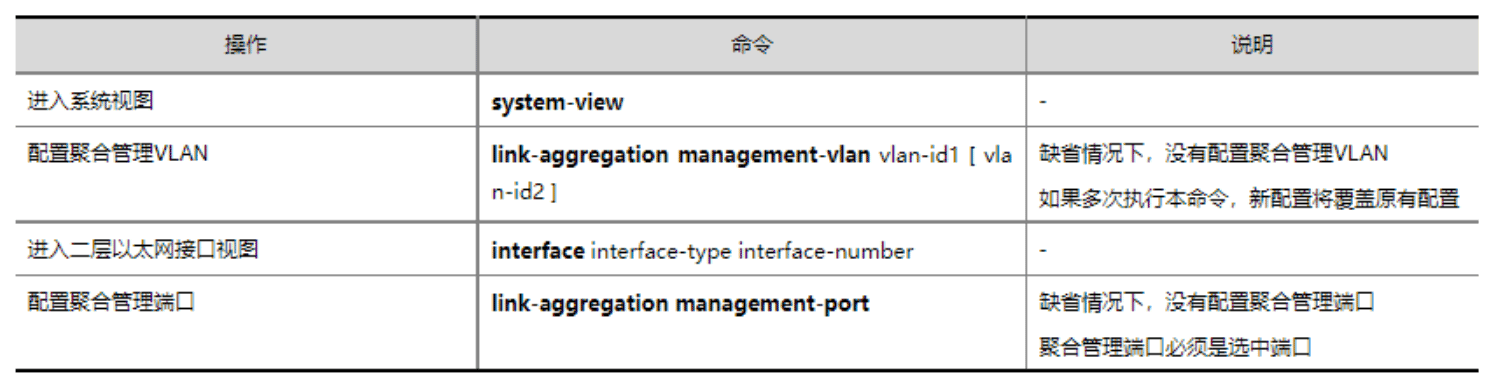
For details, please refer to: https://www.h3c.com/cn/d_201903/1157320_30005_0.htm#_Toc4502224