Physical Machine Service Principles
Function Introduction
The cloud platform supports Baremetal (physical machine) management, providing the following functions:
-
Automated Onboarding: After physical machines are onboarded and powered on, they are automatically registered to the cloud management platform, automatically allocate BMC IP addresses, initialize IPMI account passwords, and automatically report physical machine hardware configuration (CPU, memory, serial number, network cards, disks, etc.)
-
Automated Installation: Automatically configure RAID according to configuration requirements, automatically partition and format disks, automatically deploy operating system images, automatically initialize operating system account passwords, automatically allocate IP addresses, and can implant configuration files
-
Lifecycle Management: Support automated physical machine power on, power off, reinstall system, remote out-of-band management, uninstall operating system and other operations
-
Share Images with Virtual Machines: Use virtual machine images to deploy physical machines, facilitating unified operating system runtime environment for virtual machines and physical machines
-
API Support: All the above operations support API operations, facilitating integration with automation processes of other systems
-
Server Model Support: Support mainstream x86 server vendors and models such as Dell, HP, Huawei, Inspur, Lenovo, Supermicro, etc.
-
RAID Controller Support: LSI MegaRaid, HP Smart Array, LSI MPT2SAS, LSI MPT3SAS, Marvell RAID, etc.
-
Convert to Host: Directly convert physical machines to hosts running virtual machines
-
Host Existing Servers: Host physical machines that already have systems installed
Service Architecture
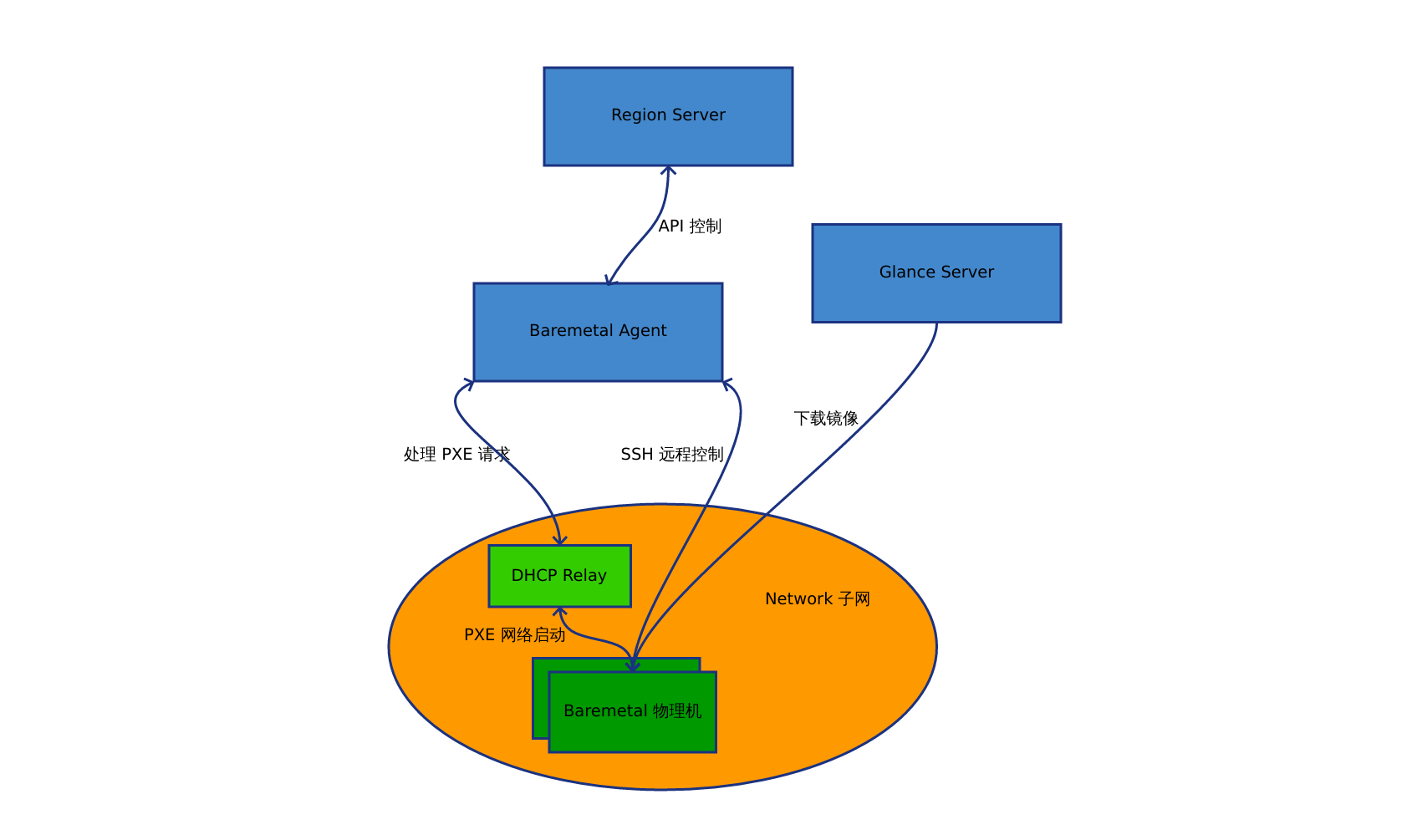
The physical machine management service architecture is as follows:
-
Baremetal - DHCP Relay: Handle PXE network boot
-
DHCP Relay - Baremetal Agent:
- Forward PXE Boot requests, obtain network boot related information
- Issue PXE configuration through DHCP and TFTP services
- Cloud platform customized PXE Boot System kernel and initramfs: Run SSH service, make RAID, collect hardware information, etc.
-
Baremetal Agent - Region Server:
- Register physical machine records through Region Server
- Obtain network IP addresses
-
Baremetal Agent - Baremetal:
- Baremetal notifies Agent of SSH related login information
- Agent configures Baremetal's IPMI through SSH
- Agent controls Baremetal power on/off and other operations through IPMI
- Agent executes RAID making, installation, destruction and other operations through SSH
-
Glance Server - Baremetal: Baremetal downloads installation images from Glance server
-
Enable DHCP Relay function on the switch (or use DHCP Relay software), relay points to Baremetal Agent
- After physical machines are onboarded and powered on, set PXE network boot, DHCP Relay will forward PXE Boot requests to Baremetal Agent, Baremetal Agent receives PXE Boot requests and registers physical machine records to Region Server
Technical Details
Register Physical Machine
There are two ways to register physical machines: automatic registration and manual registration. If Baremetal Agent has auto registration enabled, it will automatically create baremetal records in the cloud platform; if it is manual registration, you need to first call the physical machine creation interface to register the corresponding PXE network card's MAC address to the platform.
The registration process is as follows:
- When physical machine PXE boots, it will send DHCP PXE boot requests, and requests will reach Baremetal Agent through DHCP Relay;
- Baremetal Agent extracts the network card MAC address from the DHCP request and uses the MAC address to filter physical machine records from Region Server;
- Region Server tells Baremetal Agent that this MAC address has no physical machine, Baremetal Agent will create a new record and obtain an allocated IP address for the corresponding network segment from Region Server, and reply to the physical machine through the built-in DHCP service;
- After the physical machine PXE DHCP request obtains the allocated IP address, it will download boot files (kernel and initramfs) from Baremetal Agent through TFTP, then enter our customized initramfs small system using the ramdisk mechanism;
- After the initramfs small system starts, it will start the sshd service, then modify the root user password, and notify these login information back to Baremetal Agent;
- After Baremetal Agent receives the notification, it records the ssh login information and begins preparation work;
- Preparation work includes configuring IPMI, collecting hardware information, etc. After these operations are complete, all information is reported to Region Server to complete registration
PXE Boot System
PXE Boot System (https://github.com/yunionio/yunionos) is a small Linux system customized using Buildroot tool for PXE boot and physical machine management. Its functions are as follows:
- Run sshd service to provide Baremetal Agent with remote command execution
- Include drivers and tools for LSI MegaRaid, HP Smart Array, LSI MPT2SAS, LSI MPT3SAS, Marvell RAID, etc., used to make RAID
- Include ipmitool and related drivers, used to configure and call IPMI BMC to manage physical machines
- Include disk partitioning tools such as qemu-img, sgdisk, parted, etc., used to create operating systems
SSH Management
After physical machines enter the PXE Boot System through PXE, they will start the sshd service and notify Baremetal Agent of ssh login information. Baremetal Agent will update ssh related login information
RAID Configuration
RAID configuration is generated by Baremetal Agent according to user configuration, generates raid configuration commands, and remotely controls the PXE Boot System through ssh to make RAID on the physical machine
Install Operating System
After RAID is made, Baremetal Agent will remotely control the PXE Boot System through ssh to install the operating system and partition. The process is as follows:
- Call /lib/mos/rootcreate.sh to create the system to disk:
- Download the user-specified image from Glance Server through wget
- Write the image to disk through qemu-img convert command
- After the system is created, resize the system disk partition according to user configuration
- Create other partitions and format them
- Baremetal Agent performs some network and disk configuration settings: such as bonding, ip settings, /etc/fstab, change hostname, etc.
Power On/Off
Registered physical machines will have IPMI configured. IPMI related information will be recorded in the database. Baremetal Agent controls power on/off through ipmitool
Reinstall Operating System
Similar to installing an operating system, the process will make physical machines with operating systems installed re-enter the PXE Boot System, then reinstall the operating system
Remote Access
Baremetal Agent provides serial control interface through ipmitool sol
Delete Operating System
Restart physical machines running operating systems into PXE network boot, enter the PXE Boot System, call /lib/mos/partdestory.sh to destroy disk partitions and corresponding raid commands to destroy raid configuration