Git Commit Content Standards
To facilitate viewing commit records and future statistics, we have established the following standards for writing Git commit content. Please follow the following format when submitting code.
Git Commit Record Writing Standards
Format as follows:
<type>(<scope>): <subject>

<body>

<footer>
The commit content filled in through the git commit command should have a structure similar to the above, roughly divided into 3 parts (each part separated by blank lines):
- Title line: Required, describes the main modification type and summary content
- Subject content: Optional, describes why the modification was made, what kind of modification was made, development ideas, usage methods, etc.
- Footer notes: Optional, some notes
The placeholder descriptions for each part are as follows:
-
type (PR type):
- feat: New feature
- fix: Bug fix
- refactor: Code refactoring
- test: Test case related modifications
- chore: Other modifications, such as Makefile, Dockerfile, etc.
-
scope (Impact scope, related components): For example, region, scheduler, cloudcommon. If there are multiple components, separate them with commas in English, for example: (region,scheduler,monitor)
-
subject (Commit overview): It is recommended not to exceed 50 characters
-
body (Specific commit modification content): Can be divided into multiple lines, it is recommended that each line does not exceed 72 characters
-
footer (Some notes, optional): Some notes, usually related reference links, BREAKING CHANGE or bug fix links
Commit Examples
fix(region): compute NextSyncTime for snapshotpolicydisk

1. If the computed NextSyncTime equals base, base can be incremented by 1 hour and processed recursively.
2. For snapshot policies with valid retentionday, for example, a certain snapshotpolicy
takes effect every Monday, and snapshots taken are automatically retained for 3 days. Then, synchronization should be performed on Monday (take snapshot)
and Thursday (release snapshot).
feat(scheduler): add cpu filter

Added new cpu filter to scheduler:

- filter host by cpu model
- set host capability by request cpu count
fix(apigateway,monitor,influxdb): disable influxdb service query proxy
feat(climc): support disable wrap line

Usage:
export OS_TRY_TERM_WIDTH=false
climc server-list

Closes #6710
Auxiliary Tools
There are also corresponding tools to help generate Commit messages that meet the requirements. Using commitizen-go can help generate Commit messages. Usage is as follows:
# Install commitizen-go on osx
$ brew tap lintingzhen/tap
$ brew install commitizen-go
# If it's a linux environment, you can clone the source code and compile it. This tool is written in golang, so compilation is simple
$ git clone https://github.com/lintingzhen/commitizen-go && cd commitizen-go
$ make && ./commitizen-go install

# This step will generate the configuration for the git cz command
$ sudo commitizen-go install

# Test commit
$ git add .
# Use the git cz command, and it will help input commit in an interactive way
$ git cz
Related configuration reference: https://github.com/lintingzhen/commitizen-go/blob/master/README.MD#configure
Of course, the tool is not mandatory to use, but with the help of the tool, the generated commit content will be more unified ;)
Of course, there is also a nodejs version of the tool, which may be more suitable for frontend use: https://github.com/commitizen/cz-cli. Frontend developers can also use this tool.
cherry pick
Used to help users merge code to a specified release version.
1. Download and install hub
hub address: https://github.com/github/hub
# Install on Mac environment
$ brew install hub
2. Configure hub environment variables
- Edit hub file
$ vim /User/username/.config
user: <github_username>
oauth_token: <github_token>
protocol: https
- Generate github_token
github->Personal Center->settings->developer settings ->personal access tokens->generate new token
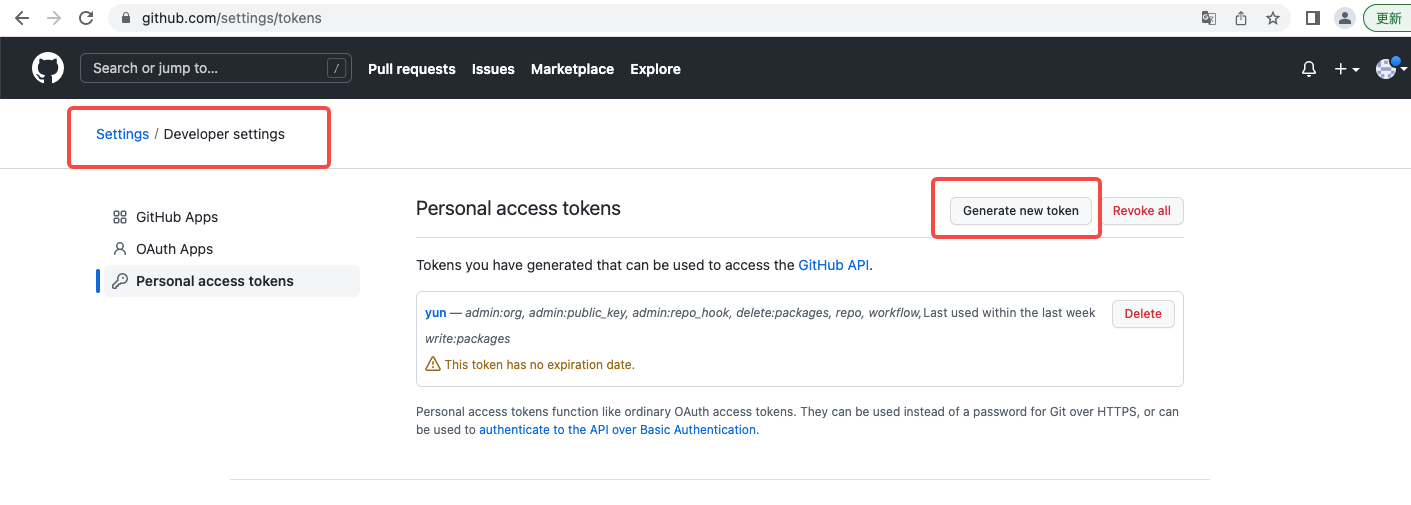
note: What is this token used for
expiration: Token validity period, it is recommended to set no expiration to keep it permanently
repo: all
Put the generated token into oauth_token in /User/username/.config
3. Execute
$ ./scripts/cherry_pick_pull.sh upstream/<branch> <PR number>
4. tips:
scripts/cherry_pick_pull can be executed repeatedly, overwriting the previous result. When "already" appears, the result has been overwritten.