Deploy EIP Gateway
Introduction to how to deploy elastic public IP gateway.
When user environments use VPC networks, since VPC networks are an isolated address space, virtual machines in VPC networks need to bind elastic public IPs (EIP) if they need to communicate with the outside. EIP is a segment of IP addresses that can be routed and accessed in classic networks. EIP gateway is responsible for IP address translation (NAT) between EIP and VPC virtual machine IPs, enabling external access to virtual machine IPs in VPCs through EIP.
After system deployment, EIP gateway is not deployed by default. Manual deployment is required. This section introduces how to deploy EIP gateway.
EIP Gateway Network Requirements
EIP gateway is the exchange node between VPC networks and external networks (underlay networks). Therefore, correct configuration is required in the underlay network to ensure that traffic with source and destination addresses as EIP address pools can pass through the EIP gateway, so that the EIP gateway can function.
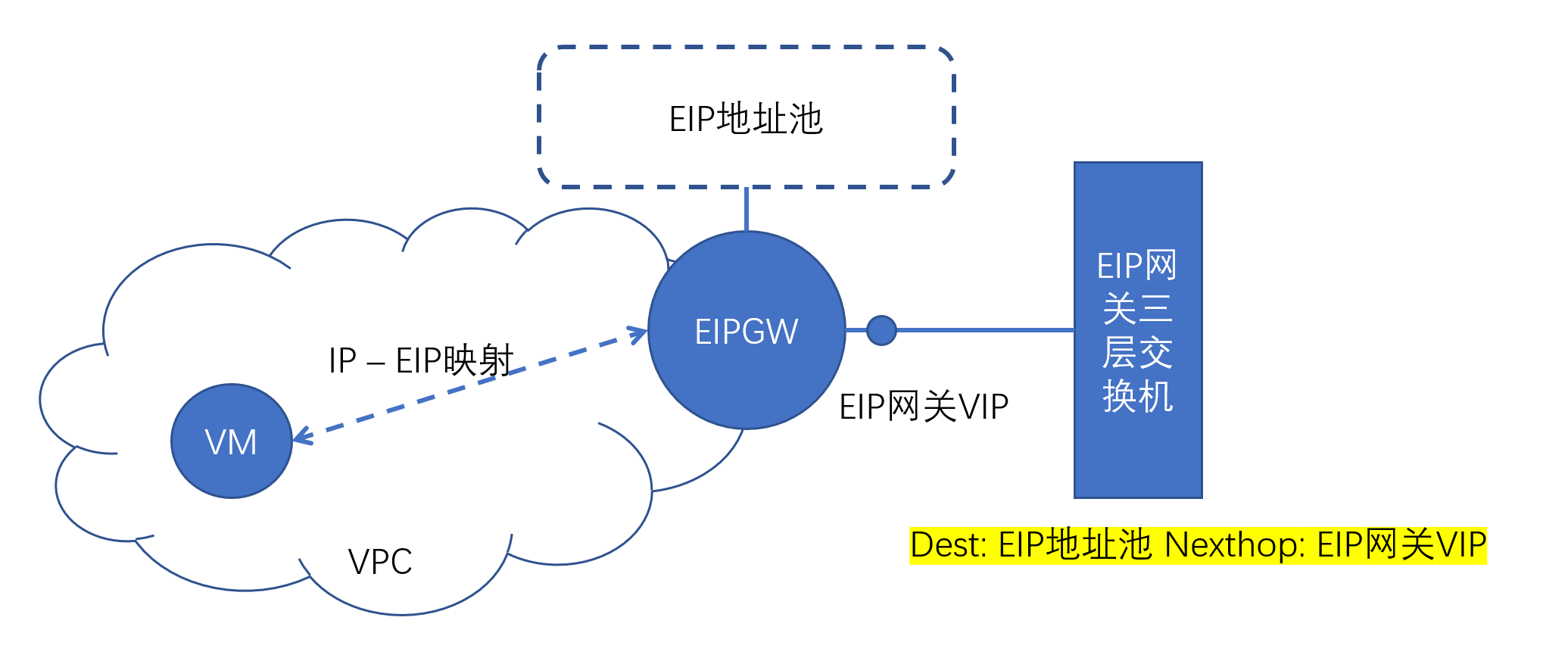
EIP gateway network requirements are as follows:
-
EIP gateway's IP or EIP is the next hop (Nexthop) of EIP address pool IPs in the underlay network. That is, in the underlay network, traffic with destination addresses as EIP address pools needs to pass through the EIP gateway.
-
EIP gateway can access all hosts' sdn_encap_ip (default is host's management IP) through the underlay network.
Deploy EIP Gateway on Compute Nodes
EIP gateway needs to depend on software packages such as ovn-controller and sdnagent. These software packages are already deployed on compute nodes. Therefore, deploying EIP gateway on compute nodes can be relatively easy to implement EIP gateway configuration under the premise of correct network configuration.
Single Node EIP Gateway
This is the simplest scenario. Select a compute node that meets EIP gateway network requirements, modify the node's /etc/yunion/host.conf, set sdn_enable_eip_man to true, restart the compute node's default-host pod, and it will take effect.
Master-Standby High Availability EIP Gateway
In this scenario, ansible scripts need to be used to implement automated deployment.
Before deployment, you need to apply for a VIP for two compute nodes.
Ansible scripts are located in the build/sdnagent/root/usr/share/sdnagent/ansible/ directory of the sdnagent code repository.
Copy the inventory file, adjust variable values according to the actual environment
sdnagent_rpm					Location of sdnagent.rpm on the current machine.  keepalived will be deployed directly from the yum repository configured on the target machine

oc_region						Variables prefixed with "oc_" are used for keystone authentication to access API services. Can be obtained from default-climc pod
oc_auth_url						through "env | grep ^OS_" command to get corresponding values
oc_admin_project
oc_admin_user
oc_admin_password

vrrp_router_id					keepalived's virtual router id value. Master and standby must be the same. If there are other keepalived deployments in the environment, they must not conflict
vrrp_priority					keepalived instance's priority, larger value is MASTER, smaller is BACKUP
vrrp_interface					Network card for keepalived VRRP communication, here is the compute node's management network card, generally br0
vrrp_vip						VIP announced between keepalived instances, can be used as the next hop address for accessing eip
After the inventory is configured, execute the ansible playbook
ansible-playbook -i a-inventory playbook.yaml
Deploy EIP Gateway on Non-Compute Nodes
EIP gateway can also be deployed to separate hosts or virtual machines that are not compute nodes, as long as EIP network requirements are met.
You need to pre-install and configure gateway required components using .rpm installation packages in the ISO. The following describes this part.
Taking 3.8 as an example, the names and locations of packages that need to be installed are as follows
# https://iso.yunion.cn/3.8/rpms/packages/kernel
linux-firmware
kernel-lt

# https://iso.yunion.cn/3.8/rpms/packages/host
kmod-openvswitch
unbound
openvswitch
openvswitch-ovn-common
openvswitch-ovn-host
After installing the kernel, you need to restart the machine to take effect
# Start openvswitch
systemctl enable --now openvswitch

# Configure ovn
ovn_encap_ip=xx							# Tunnel outer layer IP address, EIP gateway uses it to communicate with other compute nodes
ovn_north_addr=yy:32242					# ovn northbound database address, yy generally selects a host IP address; port defaults to 32242, corresponding to the port number in k8s default-ovn-north service
ovs-vsctl set Open_vSwitch . \
	external_ids:ovn-bridge=brvpc \
	external_ids:ovn-encap-type=geneve \
	external_ids:ovn-encap-ip=$ovn_encap_ip \
	external_ids:ovn-remote="tcp:$ovn_north_addr"
# Start ovn-controller
systemctl enable --now ovn-controller
After deployment is complete, you should be able to see at least one openvswitch bridge named brvpc. In the output of the ovs-vsctl show command, you can see tunnel ports named ovn-xx with type geneve, with remote-ip pointing to compute nodes' ovn-encap-ip.
For the above ovs configuration, you can use the following command to check if the configuration is correct:
ovs-vsctl list Open_vSwitch
After deployment is complete, deploy using the ansible script for deploying two compute nodes described above.
The sample inventory's hosts describe two hosts used as master-standby high availability. If high availability is not needed, you can delete one of the host descriptions and deploy only one.
FAQ: How to Resolve Multiple EIP Gateway Conflicts
AllInOne deployment will enable EIP gateway configuration on the AllInOne node by default. If users later deploy new EIP gateways according to the above steps, EIP gateway conflicts will occur. The specific manifestation is that EIP is intermittently connected.
You can use the following method to take the EIP gateway enabled by default during AllInOne deployment offline:
- Modify the AllInOne deployment node's /etc/yunion/host.conf, set sdn_enable_eip_man: false (if it is already false, this is not the case, please find another reason), and restart the node's host service
- Run the following script on this node to clean up bridges and ports generated by the eip gateway:
ovs-vsctl del-br breip
ovs-vsctl list-ports brvpc | grep ^ev- | awk '{print "ovs-vsctl del-port brvpc " $1}' | sh