Ocboot Quick Installation of AI Cloud
Use the ocboot deployment tool to quickly deploy a Cloudpods AI Cloud environment.
This chapter walks you through quickly setting up an AI Cloud environment using the deployment tool. For deploying a high-availability cluster in production, please refer to: High Availability Installation.
Prerequisites
- About GPU
- If the target machine has an Nvidia GPU, you can choose to use the ocboot tool to automatically deploy the driver and CUDA. See details later in this document.
- If there is no Nvidia GPU, the deployed environment will not be able to run inference container instances like vLLM or SGLang, but it can run application container instances like OpenClaw and Dify that do not depend on GPU.
- The operating system must be a clean installation, because the deployment tool will build a k3s cluster of a specified version from scratch. Make sure the system does not have Kubernetes, Docker, or other container management tools installed, otherwise conflicts will cause installation failures.
- Minimum requirements: 8 CPU cores, 8 GiB memory, 200 GiB storage.
- Virtual machines and services store data under the /opt directory, so ideally it is recommended to set up a separate mount point for /opt.
- For example, create an ext4 partition on /dev/sdb1 and mount it to /opt via /etc/fstab.
- On Debian-family operating systems (e.g., Debian and Ubuntu), during the first ocboot deployment, GRUB boot options will be detected and updated so that k3s can run properly. As a result, the operating system will reboot during deployment. After the reboot, simply re-run the ocboot deployment.
Supported distributions vary by CPU architecture. Currently supported distributions are as follows:
Note: 4.0 refers to Release/4.0.
| OS and Architecture | 4.0 |
|---|---|
| OpenEuler 22.03 LTS Sp3 x86_64+aarch64 | ✅ |
Install Cloudpods AI Cloud
Download Deployment Tool
The deployment tool code is at https://github.com/yunionio/ocboot/release, select the corresponding version, and download the tar.gz package of the code.
$ wget https://github.com/yunionio/ocboot/archive/refs/tags/master-v4.0.4-1.tar.gz
$ tar xf master-v4.0.4-1.tar.gz
$ cd ocboot-master-v4.0.4-1
Run the Deployment Tool
Next, execute ocboot.sh run.py to deploy the services. The host_ip parameter is the IP address of the deployment node and is optional. If not specified, the NIC used by the default route will be selected for service deployment. If your node has multiple NICs, you can specify host_ip to choose the corresponding NIC for listening.
- Mainland China
- Other Regions
# Directly deploy and pull the container image from registry.cn-beijing.aliyuncs.com
$ ./ocboot.sh run.py ai <host_ip>
For some network environments, if registry.cn-beijing.aliyuncs.com is slow or unreachable, you can specify the image source: docker.io/yunion to install, with the following command:
$ IMAGE_REPOSITORY=docker.io/yunion ./ocboot.sh run.py ai <host_ip>
The ./ocboot.sh run.py script calls Ansible to deploy services. If the script exits due to issues during deployment, you can re-run the script to retry.
Configure NVIDIA Driver and CUDA (Optional)
To install or configure NVIDIA drivers and CUDA on a node to run GPU-dependent AI container applications such as vLLM and SGLang, please refer to: Setting up NVIDIA and CUDA Environment.
Start Using Cloudpods AI Cloud
....
# After deployment completes, the following output indicates success
# Open https://10.168.26.216 in a browser, where the IP is the <host_ip> set earlier
# Log in with admin/admin@123 to access the web interface
Initialized successfully!
Web page: https://10.168.26.216
User: admin
Password: admin@123
After deployment, open the Web address output by ocboot (e.g., https://<host_ip>) in a browser, and log in with the provided credentials to access the Cloudpods console.
Enable Hosts
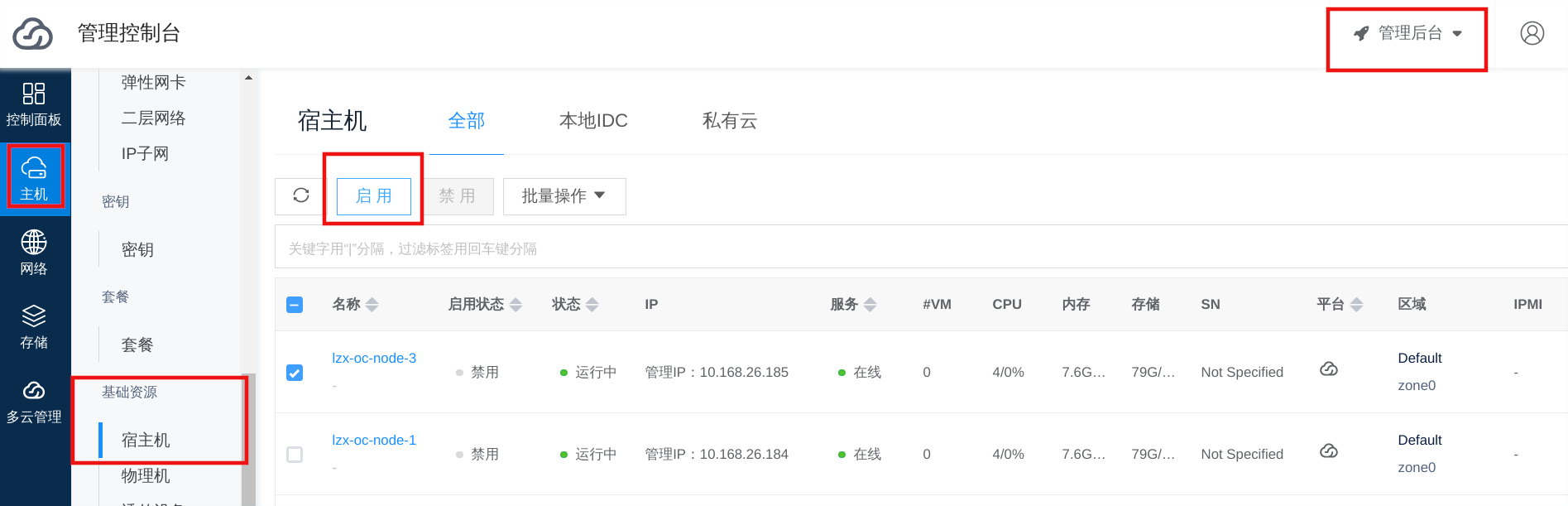
The newly created environment will be added to the platform as a host node, which is not enabled by default. Go to Compute -> Infrastructure -> Hosts to view the host list and enable the corresponding host.
Quickly Create AI Instances
Go to the "Artificial Intelligence" menu to quickly create AI applications. Please refer to the corresponding documentation based on your needs.
- Before creating applications that depend on GPU, please first complete: Setting up NVIDIA and CUDA Environment.
| Application | Type | Description | GPU Required | Quick Start |
|---|---|---|---|---|
| OpenClaw | AI App | Open-source self-hosted personal agent assistant | No | OpenClaw Quick Start |
| HermesAgent | AI App | Open-source autonomous agent from Nous Research | No | HermesAgent Quick Start |
| Dify | AI App | LLM application development and workflow orchestration platform (can connect to inference services) | No | Dify Quick Start |
| ComfyUI | AI App | Image generation and node-based workflow application | Yes | ComfyUI Quick Start |
| vLLM / SGLang | AI Inference | Inference services deployed by template type | Yes | AI Inference Quick Start |
FAQ
1. How to add more AI nodes?
To add new nodes (especially GPU nodes) to an existing cluster, if you need to run GPU-dependent AI applications, it is recommended to first configure NVIDIA/CUDA. Refer to: Setting up NVIDIA and CUDA Environment. Then complete the host addition and enablement. Refer to: Adding Compute Nodes.
2. How to upgrade?
Please refer to Upgrading via ocboot (if AI Cloud shares the ocboot upgrade process with private cloud).
3. Other questions?
Feel free to submit issues on Cloudpods GitHub Issues: https://github.com/yunionio/cloudpods/issues. We will respond as soon as possible.